

You’re just been alerted to the fact that your Twitter account has been hacked… you’re anxious to discover how this could have happened and you want to know what steps to take to secure your Twitter account and ensure you don’t fall foul to this attack ever again?
In this blog post, I will walk you through how to secure your account again and also demonstrate how it happened so you can make sure you are never again a victim of a Twitter hack
How was my Twitter account hacked?
At some point recently you have received a Direct Message (DM) from someone you follow in Twitter exclaiming that you have been written about in a blog, featured in a video, included in a photo or some such other good or bad thing that includes you.
There are multiples forms of this DM so below I have copied 4 of the more common style of messages (names removed to protect the innocent!)

Malicious Spam Twitter Direct Message #1
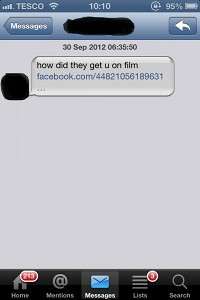
Malicious Spam Twitter Direct Message #2

Malicious Spam Twitter Direct Message #3

Malicious Spam Twitter Direct Message #4
When you saw this DM had come from someone you recognise (because you follow them in Twitter) you believed it was genuine and clicked on the link to see what all the fuss was about..
And therein lies the root cause of your Twitter account being hacked!
Because there is no such picture/video/blog about you… the link is infected with a malicious Trojan that awards the hackers access to your Twitter account to send tweets on your behalf
I think you can guess what happens next? Yep… they send the same infected DM to all your followers and the cycle starts again!!
So, prevention is actually very simple… DON’T CLICK THE LINK!!
To be honest, I am wary of any links in DMs and don’t trust any until the sender has confirmed to me that the link is genuine. So to be safe, I would recommend you follow that strategy yourself.
Now you know how to prevent your Twitter account being hacked, let’s talk about securing your account
How do I secure my Twitter account following a hack?
Immediately change your Twitter password. This cuts the link between the hackers and your account meaning they can no longer send DMs in your name.
Next, as a precaution, click on the little cog image on the top right hand side of Twitter.com, then click on “edit profile”, on the left hand side click on “apps”
This is a list of every 3rd party application that you have granted access to your Twitter account. For example if you use Hootsuite or Tweetdeck, you will see those listed… these apps need API access to your account so you can read your tweets and respond to messages through their platform.
Now look through the list and check for any apps you don’t recognise… if you find an app connected to your Twitter account that concerns you, simply revoke access to the app by clicking the “Revoke Access” button on the right hand side.

And finally, it would be a good idea to tweet all your followers alerting them that your Twitter account has been hacked and advising them not to click on the link in any DM they have received from you.
And… relax! Your Twitter account is secure, you know how to prevent it being hacked again and you’ve done your best to warn your followers. Panic over.
If you found this blog post helpful, please share it with everyone you know using the share buttons below. Any queries or comments… please pop them in the comment box below and I will respond

Latest posts by Veronica (see all)
- Getting Ready to Comply With VAT MOSS Using Paypal - December 31, 2014
- Why a Combi Boiler Has More in Common with Your Business Success Than You Might Think! - December 18, 2014
- 3.5 Reasons Why Your Prospects Are Not Buying Your Offers! - December 11, 2014


Thanks for commenting Gary, and I know online security is your area of expertise… and you are of course quite right in everything you’ve said here.
Except, this blog is about the specific issue of those rogue DM’s referencing “a very funny photo of you”, “a blog post about you” and other such nonsense that spammers with too much time on their hands like to send out that dupe Twitter users into clicking their malicious links… leading to their Twitter account being hacked.
In these circumstances, the remedies I’ve listed in this blog will secure the account again and eliminate the spammers’ access to send DMs to followers of hacked accounts.
I’d love if you wanted to do a guest blog for this blog on how steps social media users can take to keep themselves secure though if you fancy it? Let me know and we can figure out the details
Hi Veronica,
It’s great that you’re promoting online security but there are several technical oversights in your document that could mislead the readers and give them a false sense of security, lulling them in to compromising themselves when other scams appear.
1) Clicking a link in a DM is not the only way that your account might be compromised. Your article makes it sound like this is the only thing people need to be wary of.
2) A link might hide several things, not just a malicious trojan.
3) Suffering a ‘malicious trojan infection’ would only compromise your Twitter account if a) it included a keylogger and you then logged in to Twitter, providing your username and password to the trojan/worm/virus or b) it included a very advanced network sniffer which captured your session cookie.
4) A targeted link is more likely to add a rogue application to your Twitter account so the bad guys never actually have your username/password so changing it would make no difference. While your point of clearing up apps would catch this your article makes a clear commitment that changing the password is the primary task, which is not accurate.
5) If the link did result in an infection then you’ve left a big gaping hole in not clearing up that infection and the account is likely to keep being compromised.
6) A sufficiently advanced Twitter bot can intercept DM responses, pick up on keywords and provide an appropriate response, essentially faking a confirmation that the link is genuine.
While your I acknowledge that your intentions are noble, your article uses technical terms which have specific meanings and muddling these terms is likely to leave your audience confused, if not now then later when the term is used correctly in some other article. One final point, assuming your article is aimed at an audience that’s not necessarily technically minded terms like API are also likely to leave people confused.