
Send browser push notifications to put your message in your audience’s direct line of sight, wherever they are online – for free!
I’ve just come across this neat little online tool that I think you’ll love! 10 minutes of set up, and you (literally!) can get your latest blogs, lead magnets and offers directly in front of your audience.
I’m going to put my neck on the line here, and say I reckon this could be the next big thing in internet marketing too! And that’s not something I say often!
The average person receives 147 emails every day, so it can be difficult to get your email marketing read by your subscribers.
Social media sites like Facebook and Twitter are ‘noisy’, so it can be a challenge to stand out from the crowd and get your posts and ads seen.
With this fantastic little tool, you can send browser push notifications to put your message in your audience’s direct line of sight, with ZERO competition for attention.
The tool is called PushCrew and it works by sending push notifications to Chrome and Firefox browser users.
How to send browser push notifications via PushCrew…
Visitors to your website will see a (customisable) popup appear in front of them, inviting them to allow browser push notifications.
Here’s my invite message that pops up on my website, when you’ve been on my site for 15 seconds. If you’re reading this on Chrome or Firefox, you’ll see the pop up appear shortly too.

(Think strategically about this invite. What incentive can you offer in exchange for their allowing your push notifications? If you’re a retailer, how about offering a discount coupon? If you’re a service business, how about exclusive invites or private access to something?)
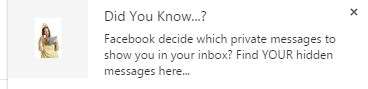
The visitor clicks on the ‘Allow’ button, and now when you send push notifications, they will see your message in the corner of their browser window – where new email notifications show briefly. Except, the push notifications stay on the user’s screen until they click on the little ‘x’ to close it.
I’ve just sent a push notification announcing a blog post. Here’s how it appears on my screen, and when the notification is clicked, they will be taken to the actual blog post.
Imagine how powerful this could be?
The basic level of PushCrew is free, then there are two paid levels, starting at $25/month. I’m still using the free level while I test it.
Check out PushCrew here: https://pushcrew.com
To get this set up on your website, you will need to add a piece of code to the <head> </head> area of your website, or add the PushCrew WordPress or Joomla plugin. If you already have the Tracking Code Manager (free) WordPress plugin installed on your site to manage your Facebook advertising pixel, the PushCrew code can be added into the Tracking Code Manager plugin instead.
And don’t forget, if you see my invite pop up at some time around now, please click on ‘Allow’ so I can send you push notifications of exclusive content, training and offers that will only be announced via push notifications! 🙂

Veronica Pullen
Latest posts by Veronica Pullen (see all)
- What Could You Sell? 30 Things People Over 40 Already Know That Others Will Pay to Learn - October 18, 2026
- Somatic Copy Case Study: Turning Katya Varbanova’s Difficult Announcement Into 100% Positive Feedback - April 1, 2026
- The Secret Envy That Drives Sales - December 18, 2025


Big shoutout from the PushCrew crew for sharing your thoughts about PushCrew. We loved the post. 🙂
This is a great tool we have been testing and using for about 6 weeks now over at http://www.motorhomeholidaycompany.com and the results have been fantastic so far – Go ahead and try it out – you may win a week in one of our luxury motorhomes…