

Over the years, you will have amassed hundreds or thousands of likes on your Facebook business page.
Whilst you’d be forgiven for thinking that the people who have liked your page are interested in you or your business, you’d also be very wrong!
Let’s be honest here for a moment. How many Facebook pages have you liked over the years that you’ve taken very little notice of since?!
LOADS, right?
If you’ve ever participated in a like ladder, or posted asking for page likes in exchange for you liking their page, then the percentage of your page fans who have any interest in you is probably even lower than my best conservative guess.
Here’s the issue, though… if you’re boosting Facebook posts, you’re PAYING to advertise to the people who like your page – those people who have taken no notice of you in ages and couldn’t give a flying fig about you.
If you’re boosting posts to promote paid offers, is it any wonder why you’re making very few sales?
After all, if these pages you have liked over the years but paid no attention to suddenly appeared in your newsfeed wanting you to buy their stuff, you’d likely keep scrolling too.
So, assume that everyone who has liked your page is your COLD audience – e.g. they don’t know who you are and couldn’t give a crap about you/your business/your offers – UNLESS they take an action to demonstrate that they are interested – e.g. they join your WARM audience.
How to track the Facebook users who are in your WARM audience
There are two ways that you can track who has demonstrated interest in you/your business/your offers.
- Track the people who visit your Facebook page or interact with specific post/s on your Facebook business page.
- Track the people who visit your website or specific page/s on your website.
These are called “remarketing audiences”, and you can track your remarketing audiences very simply, using Facebook’s ads manager.
Building your remarketing audiences enables you to segment the audiences who see your Facebook ads. You can get super specific with your messaging and achieve better results by targeting your promotion more effectively.
In this post, I’m going to focus on the Facebook page engagement remarketing audience.
How to create your Facebook page engagement audiences:
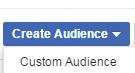 Go to Ads Manager in Facebook:
- Click on the ‘hamburger button (three horizontal lines, top left) and select ‘Audiences’.
- Click on ‘Create Audience’.
- Select ‘Custom Audience’ from the drop-down menu.
- Then, select ‘Engagement on Facebook’ at the bottom of the next page.

Now you’ll see four options:

We’re going to talk about two of those; video and page.
How to track who watches your videos on Facebook
After following steps 1-4 above, select ‘video’ on the next page, and you’ll be presented with the following options:

You can create audiences for each of these options PER VIDEO uploaded and posted from your page (including livestreams), or you could choose the one/s most effective for you to track.
Two suggested strategies for how to use video audiences
Video remarketing strategy #1: To track group members
You can’t target your ads to members of specific groups currently, but you could record a video that is super valuable to the group members, post it on your page, then share the page post in the group.
Next, create a ‘watched 3 seconds of your video’ remarketing audience to track people who watch at least 3 seconds of your video.
If you only really promote this video in this one group, you can make an assumption that the large majority of the people who are tracked as having watched at least 3 seconds of your video are members of that specific group.
So, if you later have something that you want to advertise to these group members, you’ll be able to target your ad to this ‘watched 3 seconds of your video’ remarketing audience.
Video Remarketing Strategy #2: To track the people most likely to have heard an offer you announce on a Facebook livestream.
So, say you do a Facebook livestream, and at 50% of the way through the live broadcast, you start talking about your offer.
When you finish the broadcast, post the livestream (replay) on your page, and create a video remarketing audience for ‘people who have watched 50% of your video‘.
You can track the people who watched at least 50% of the video, knowing that if they stayed that long, they have heard the details of your offer.
Now you have the opportunity to put an ad in front of them, giving them more details on the offer, overcoming objections, or showing them a case study from a previous client – basically helping them to make the decision if the offer is right for them.
Those who didn’t watch at least 50% of the video can see a separate ad – e.g. a piece of value adding content that has the offer details at the end with the call to action (CTA) to buy.
So rather than showing everyone the same ad, you can segment your audiences so your messaging is specific to their situation, and your advertising is more targeted/effective.
How to create an audience of people who engage with your Facebook business page
Follow steps 1-4 above, and this time, instead of choosing ‘video’, choose ‘page’.
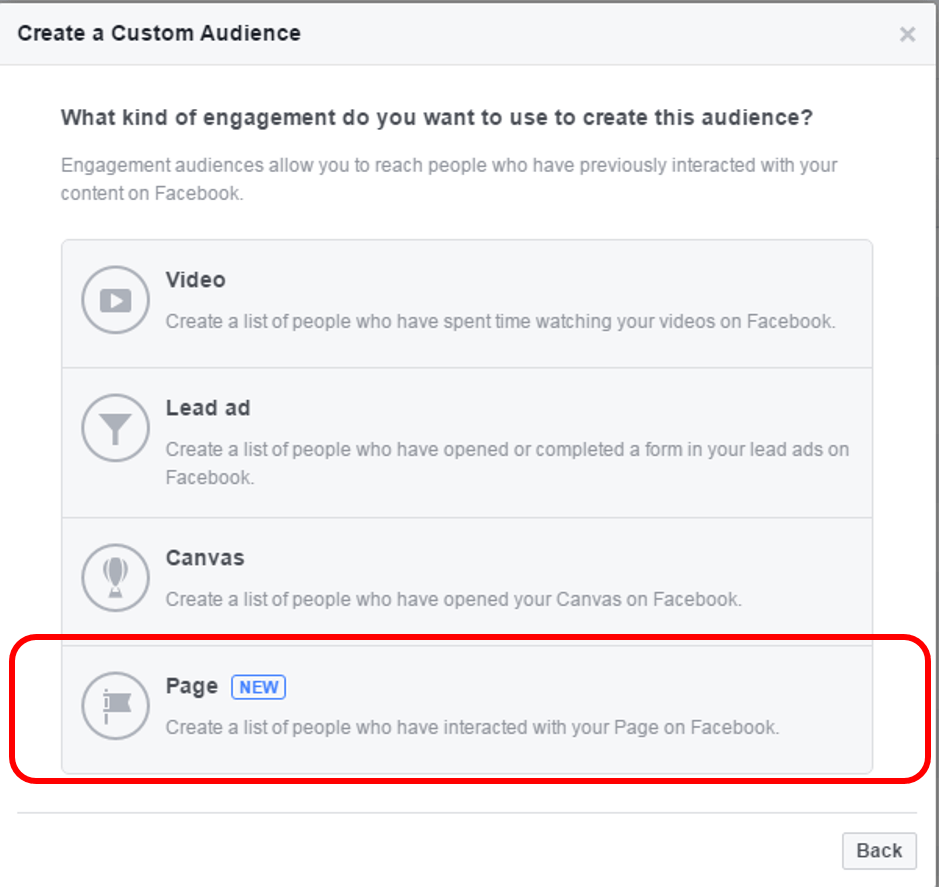
(If you don’t see this option yet, wait a few days as it is still being rolled out)
On the next page, you’ll see the following choices:

I recommend you take five minutes NOW to create separate audiences for:
- Everyone who engaged with your page
- Anyone who visited your page
- people who engaged with any post or ad
Change the “in the past…” option to ‘180 days’ – e.g. the number of days you wish to track visitors. If they join the audience today, but do nothing more to engage with your page/posts for 179 days, they will still be included in the audience. (This is the maximum number you can select).
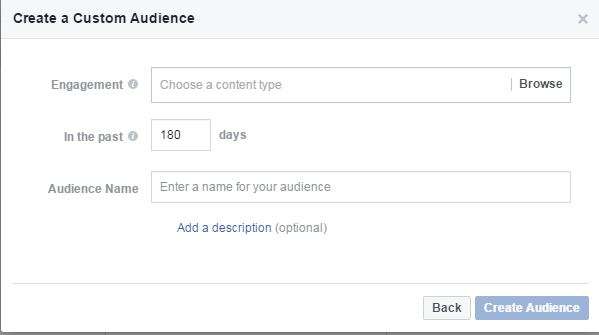
Finally, give your audience a name that makes sense to you and that you’ll recognise when you’re choosing which remarketing audience to target your ads to.
And save. That’s it. Simple, eh?!
You can decide if you want to create remarketing audiences to track the rest of the options or not.
Even if you have no intention to run Facebook ads in the near future, get these audiences set up now so they can be building for you in the background, ready for when you want to use them.
Anyone in any of these remarketing audiences are in your WARM audience. Unlike the majority of your page fans who aren’t taking any notice of you, these groups are interacting and engaging with you.
Imagine how powerful your Facebook advertising will be when you stop paying to put ads in front of people who aren’t interested, and instead, focus your efforts on those most likely to convert.

Veronica Pullen
Latest posts by Veronica Pullen (see all)
- What Could You Sell? 30 Things People Over 40 Already Know That Others Will Pay to Learn - October 18, 2026
- Somatic Copy Case Study: Turning Katya Varbanova’s Difficult Announcement Into 100% Positive Feedback - April 1, 2026
- The Secret Envy That Drives Sales - December 18, 2025
Connect on Social Media