

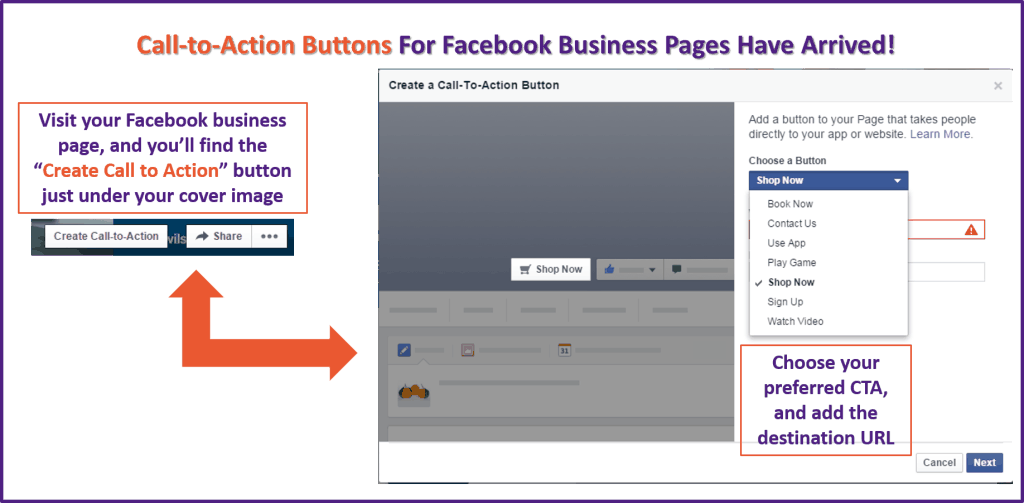
We’ve been promised them for a while, but today the Facebook Call to Action button has gone live on my (and most of our managed clients’) Facebook business page. It’s still being rolled out, so don’t panic if you don’t have it yet. It’ll turn up soon.
The Call to Action button sits at the top of your Facebook business page, and allows you to encourage your page visitors to take a specific action. There are 7 CTAs available;
- Shop now
- Contact us
- Watch video
- Sign up
- Book now
- Use app
- Play game
Just pick the option that is most appropriate to the action you want your page visitors to take, and enter the destination URL.
On the next pages you’ll be given the option to choose different destination URLs for visitors who are browsing on mobile, IOS and Android devices if you’d prefer they were taken somewhere different.
For example, if you have an IOS app for your business, you might choose to send IOS users to the app, rather than your website.
To customise your Facebook Call to Action button, simply click on the button just under the cover image on your business page, and within 30 seconds your new button will be up and running!

Veronica Pullen
Latest posts by Veronica Pullen (see all)
- What Could You Sell? 30 Things People Over 40 Already Know That Others Will Pay to Learn - October 18, 2026
- Somatic Copy Case Study: Turning Katya Varbanova’s Difficult Announcement Into 100% Positive Feedback - April 1, 2026
- The Secret Envy That Drives Sales - December 18, 2025
Connect on Social Media